
Email it in: your company’s paperwork address
One private address per company. Forward a page to it and it is read, filed, and answered within a minute.
Paperwork doesn’t start in the app. Dispatch texts a photo of the load sheet, the carrier emails the settlement PDF, a driver texts a fuel slip from the island. Forwarding is the one thing every phone and every mail program already knows how to do — so every company gets its own private email address, and anything sent to it gets read and filed.
Your address
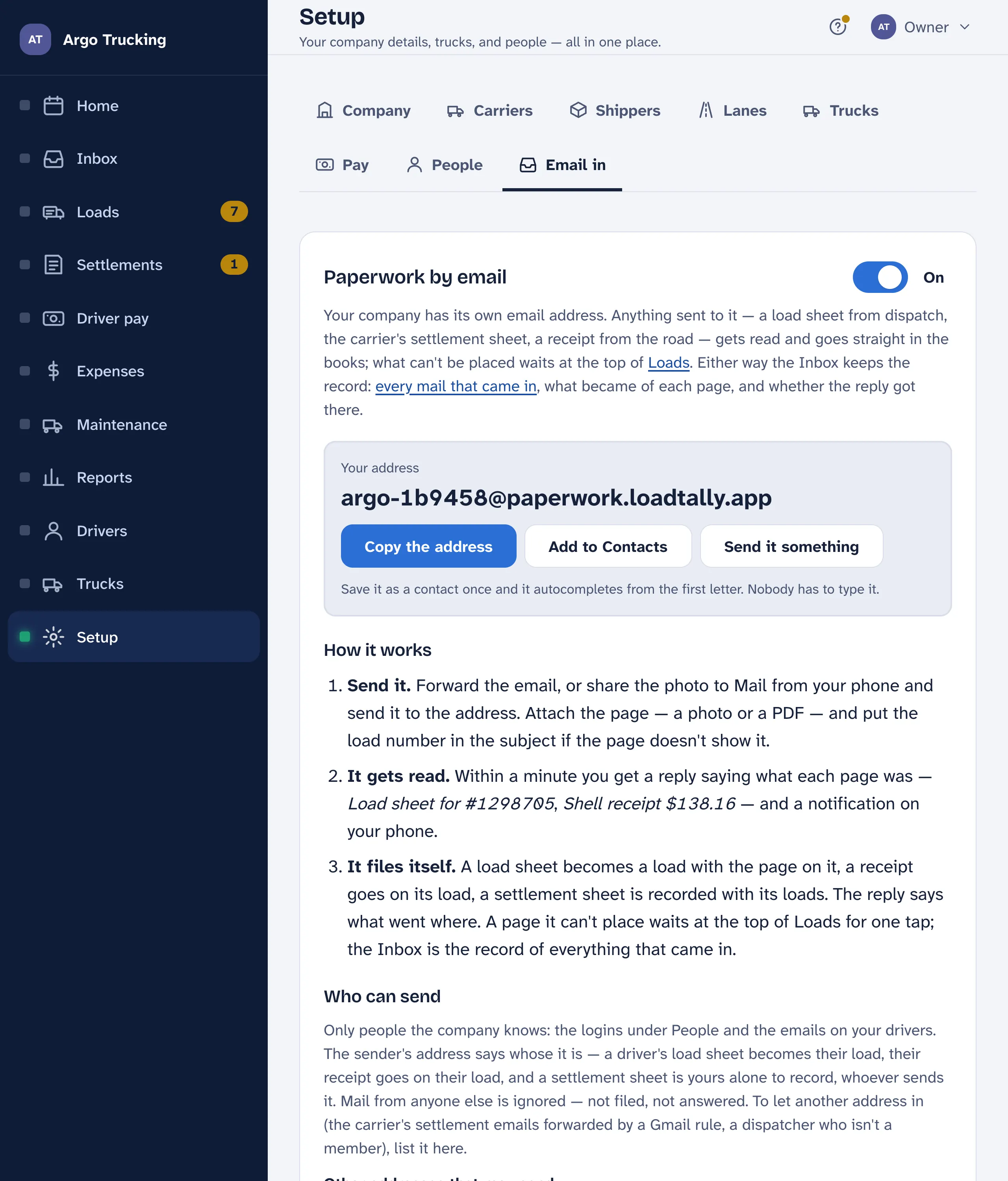
It is under Setup › Email in, and it looks like argo-k4m2x9@paperwork.loadtally.app: your company’s short word, then a dash and six random characters so nobody else’s mail can land in it. Nobody types it. Copy the address puts it on the clipboard; Add to Contacts saves it on your phone so it autocompletes from the first letter; Send it something opens a new mail to it so you can try it right now.
What to send
- A load sheet from dispatch — the delivery receipt, a rate confirmation, or a screenshot of the text.
- The carrier’s settlement sheet — the Friday PDF. Forward the email as it is.
- A receipt from the road — fuel, DEF, a toll, a wash. A photo is fine.
- A shop invoice for a service on a truck.
Attach the page as a photo or a PDF. Several in one mail is fine; each page is read on its own. If the page doesn’t show the load number, put it in the subject — load 48870 — and the page lands on that load.
From a phone
- A photo in a text: press and hold it, tap Share, pick Mail, and send it to the address. The address autocompletes once it is in your contacts.
- An email: open it, tap Forward, and send it on. The attachment goes with it.
- Paper: take a photo, then share it to Mail the same way. Or use the box in the app — see Snap a photo.
From the office
Forward the carrier’s email, or better, set up a rule once so their settlement sheets forward themselves the day they arrive. Set up a rule walks through it for Gmail, Outlook, Yahoo and iCloud.
What comes back
Within a minute or two, a reply: Got it — 2 pages filed. Load sheet for #48870 and a Pilot receipt. Check them here. A thick PDF is read a page at a time, and the reply comes once the last page is done — the Inbox shows each page as it is read. The button opens the record it was filed on. Whoever’s phone it is gets a notification with the same words. If nothing was attached, the reply says so. If a page couldn’t be read as any of the four kinds, the reply says that too, and the page waits at the top of Loads for you to place it.
Where it lands
Straight in the books. A load sheet becomes a load with the page on it, a receipt goes on its load, a settlement sheet is recorded with its loads — the moment it is read, and the reply says what went where. A duplicate load or settlement number attaches to the one you have instead of doubling it, and anything filed this way carries a Filed for you mark with who sent it and when.
A page it can’t place — a receipt for a load not entered yet, a page it couldn’t read — waits at the top of Loads with the one tap that files it. The Inbox keeps the record of every mail and what became of each page.
Who can send
Only people the company knows: the logins under Setup › People, the emails on your drivers, and any address you list under Other addresses that may send — the carrier’s settlement robot, a dispatcher who isn’t a member. Mail from anyone else is ignored: not filed, not answered. It still shows under What came in, marked ignored, so you can see who was turned away.
The sender’s address also says whose the page is. A driver’s load sheet becomes their load; their receipt goes on their load, waiting for your okay. A settlement sheet is the office’s alone, whoever sends it.
If the address gets out to someone it shouldn’t have, Get a new address at the bottom of the tab. The old one stops working the moment you do. Update your contact and any mail rules.
The small print
- Photos and PDFs only, up to 20 MB each and ten to a mail.
- A tiny inline image — a logo or a signature in an email footer — is dropped rather than read. An inline PDF, however small, is a page.
- The same page sent twice is caught and not filed again; the reply says so.
- The whole feature has a switch at the top of the tab. Off, mail to the address is ignored; what was filed stays, and so does the record.